Open FluentAuth → Dashboard for a summary of login activity and the latest security checks.
This page describes the dashboard as it was rebuilt in FluentAuth 3.0.0, captured on a local development site. On 2.1 and earlier the screen is simpler and several of the controls below are not there.
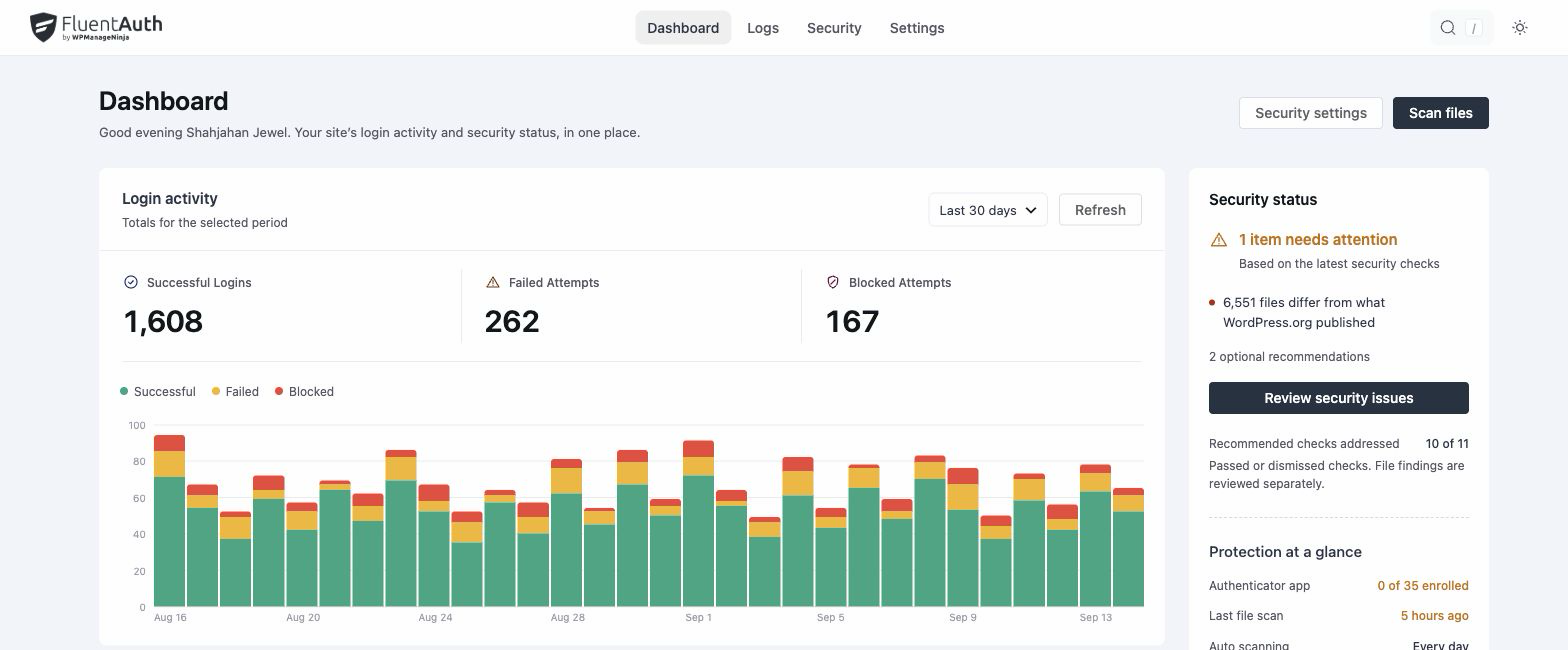
Choose a date range
Use Activity period to choose Today, Last 7 days, Last 30 days, This month or All time. Refresh reloads the activity. Times use the site’s timezone.
Login activity
The three totals are Successful Logins, Failed Attempts and Blocked Attempts. Select a total to open the activity log filtered to that result. The chart shows how the counts changed over the selected period.
Failed attempts include incorrect credentials. Blocked attempts include attempts refused by login limits or IP rules. These numbers describe recorded events; they are not a count of unique attackers or a guarantee that every threat was stopped.
Recent activity and top sources
Switch Recent activity between Failed & blocked and Successful sign-ins. Open Open the activity log for the full history, search and filters.
Top sources of failed & blocked attempts lists the busiest addresses, how many usernames they tried and their latest attempt. Review an address before using Block IP: an office, VPN or misconfigured proxy can put several people behind the same address.
Sign-in methods breaks down successful logins by method.
Security status
The right-hand panel summarises the latest findings. Review security issues opens the security checklist. Recommendations done includes passed or dismissed recommendations; it is not a score proving the site is secure.
Current protection links to enrolment, file monitoring, log retention and summary email settings. Login counts and enrolment are different measures: users with a device factor are tracked in 2FA Enrollment.