← All features
Recovery tools

Take the next steps after suspicious activity.

Bring session revocation, password-reset requests and file recovery actions into one place for administrators.

New in FluentAuth 3.0.

How it works

From suspicious activity to a controlled response

An example response using the recovery tools. Choose actions based on the evidence and keep a backup available.

your-site.com/wp-admin/recovery

Review active access

This browser
Current operator
Another browser
Review session
Application password
Review integration
Take a controlled next step

Check account activity and file findings so you understand the scope of the concern.

Why it matters

When access looks suspicious, every next step matters.

An unfamiliar session or changed file can leave you jumping between account settings and maintenance tools. A considered response needs a clear view of the available actions and their effects.

How it helps your site

Reduce access and repair specific changes.

FluentAuth brings supported session, account and file actions together. Revoking other sessions or application passwords can cut off those access paths. File recovery can replace supported originals. You still need to identify and address the cause of an incident.

What you gain

Move from investigation to deliberate action with the relevant controls in one place.

Get FluentAuth →
Inside FluentAuth

See the controls behind the experience.

New in FluentAuth 3.0.

Follow the setup guide →
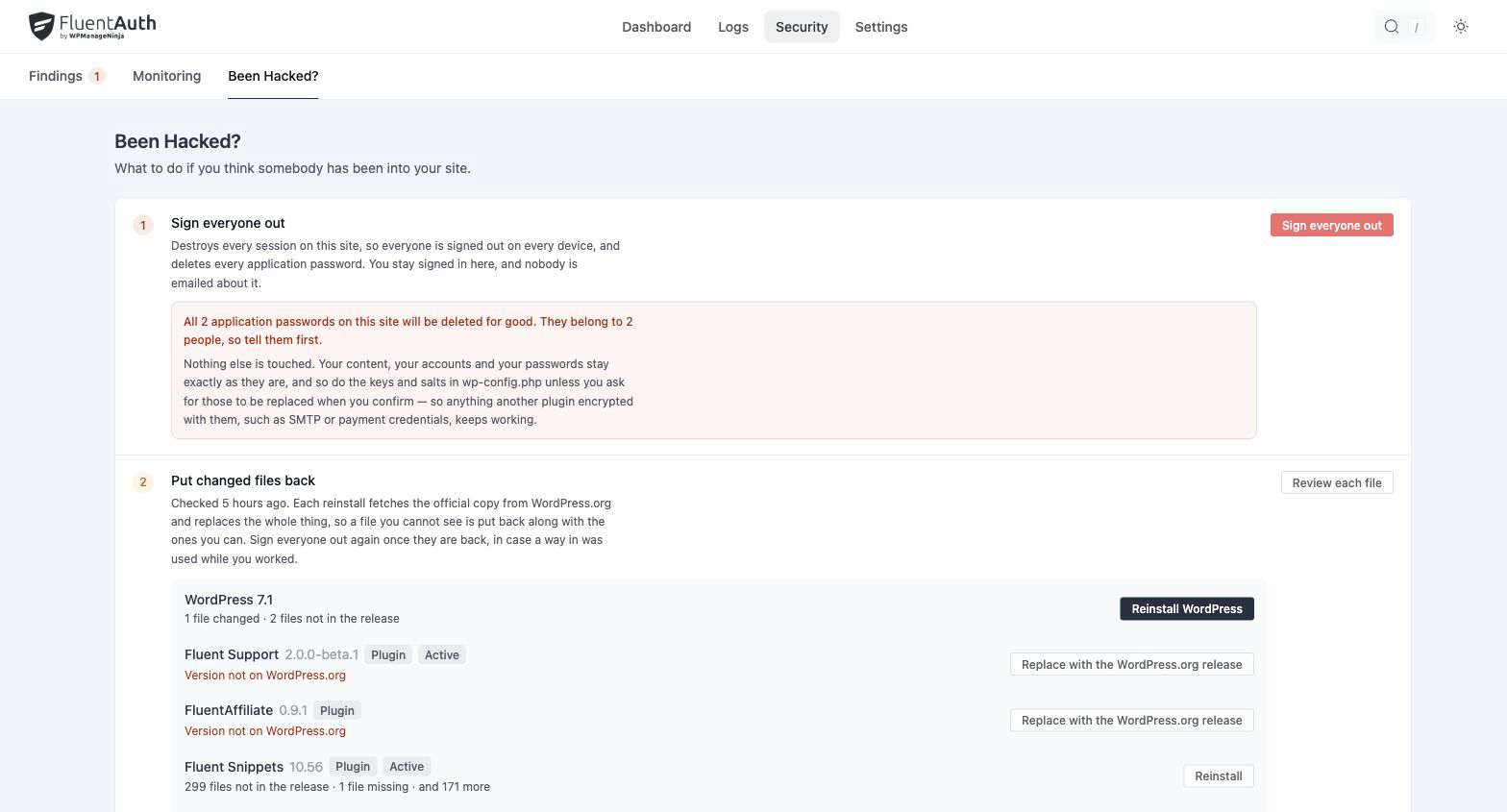
FluentAuth recovery tools settings and results on a local development site.
FluentAuth recovery tools settings and results on a local development site. Select the image to view it full size.

How recovery tools help

  1. Revoke other active sessions and application passwords when access needs to be reviewed.
  2. Send password-reset emails to affected users and consider the optional salt rotation action.
  3. Review changed files, restore supported originals or reinstall official packages where appropriate.

Signing everyone out keeps the current operator’s session. Sending a reset email does not invalidate the user’s current password until the reset link is used.

Keep a usable recovery path

These actions can interrupt other users, integrations or legitimate customisations. Read the confirmation for each action, preserve evidence and have a backup available before replacing files.

Does this replace a backup or incident response service?

No. Recovery tools provide specific actions inside WordPress. They do not prove that a compromise has been removed. Investigate the cause, update affected software and seek specialist help when the scope is unclear.

Keep your response tools within reach.

Walk the recovery workflow now and plan your response before you need it.