← All features
Custom login & signup forms

Put the sign-in flow where your members are.

Embed login, registration, password-reset and magic-login forms in your own WordPress pages.

Available in the current release.

How it works

From a page shortcode to a complete login

A member signs in through a FluentAuth form embedded in your WordPress page.

WordPress page editor · Members

Add a shortcode block

[fluent_auth]
A shortcode becomes a sign-in form

Enable custom forms and add the appropriate shortcode to your page.

Why it matters

Your members should not need a detour to sign in.

When the account journey lives outside your site’s familiar layout, visitors can lose their place. Embedded forms let you offer sign-in and recovery where those actions make sense.

How it helps your site

Use the supported authentication flow inside your page.

FluentAuth forms bring enabled login options and required verification into your own layout. Registration still follows WordPress settings. The surrounding page design does not replace authentication or destination access controls.

What you gain

Build a connected account journey with your existing editor or page builder.

Get FluentAuth →
Inside FluentAuth

See the controls behind the experience.

Available in the current release.

Follow the setup guide →
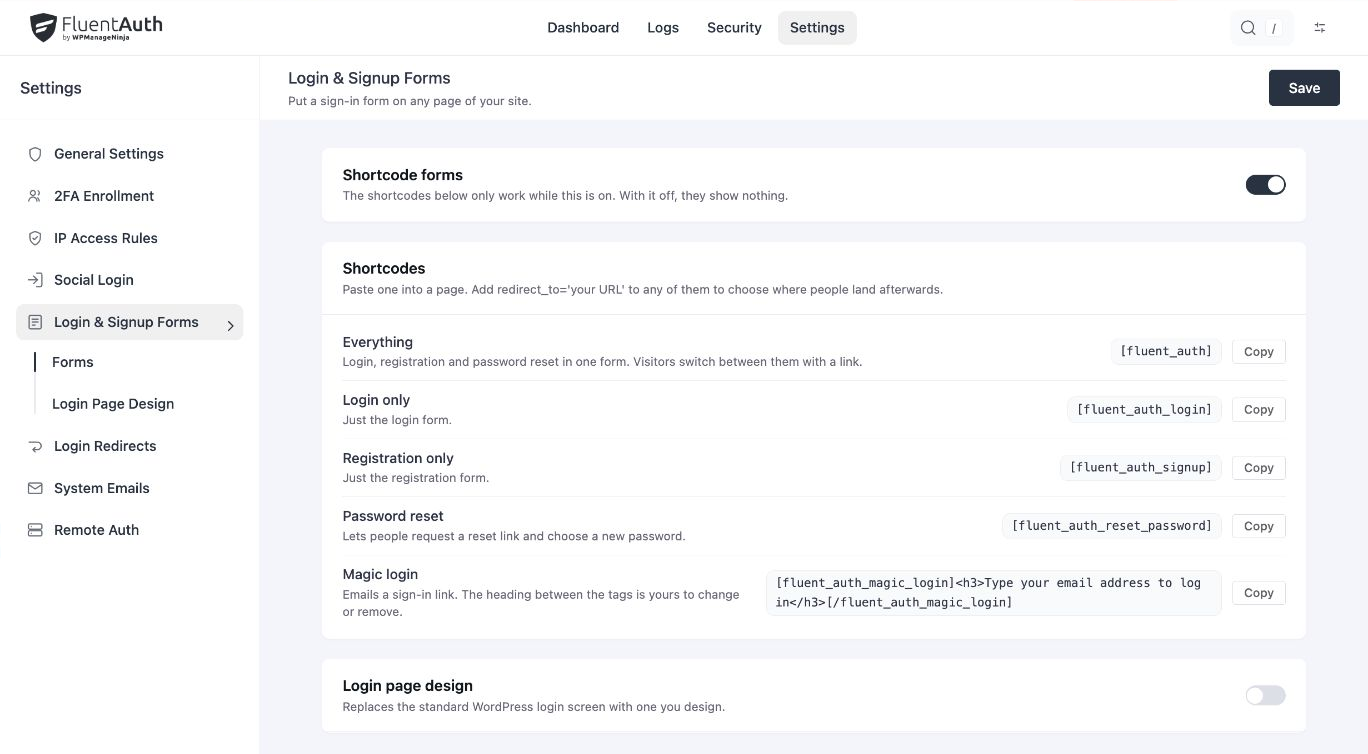
FluentAuth custom login & signup forms settings and results on a local development site.
FluentAuth custom login & signup forms settings and results on a local development site. Select the image to view it full size.

How to add a form

  1. Enable custom authentication forms in FluentAuth settings.
  2. Copy the appropriate shortcode from the Login & Signup Forms screen.
  3. Add it to your page and test with a signed-out visitor and an existing user.

The combined shortcode is [fluent_auth]. Dedicated shortcodes are also available for login, signup, password reset, magic login and social buttons.

Fit the form to the page’s purpose

A course landing page might need social buttons and a login form. An account-help page may need only password recovery. Shortcode attributes let you control destinations and what happens when the visitor is already signed in.

Does embedding a form change registration permissions?

No. Signup follows the WordPress registration setting. Enabled verification methods and supported sign-in options remain part of the form flow. Review caching on authentication pages and test the complete journey before publishing a new form.

Bring the account journey into your own pages.

Choose a shortcode, add it to your layout and test login, registration and recovery.