Suspect a WordPress compromise? A practical response sequence
Preserve useful evidence, contain account access and investigate files before deciding that recovery is complete.
Unexpected administrator activity, an unexplained redirect or a changed file deserves investigation. Each can have a legitimate cause, but dismissing the event without checking leaves the question unresolved.
A useful response has an owner, a record of what happened and an order of work. FluentAuth’s recovery workspace, added in 3.0, provides supporting account and file tools. Bring your host or an experienced responder into the process when you cannot establish the scope yourself.
Record what you know
Write down when the issue was noticed, which pages or accounts are affected and what changed recently. Preserve relevant logs and copies of suspicious files through your normal maintenance process. Avoid publishing sensitive records or opening suspicious files as executable code.
If your host can take a snapshot, identify it as evidence of the current state. Do not assume that a backup made after the incident is a clean recovery point. Keep a separate record of any backup you have reason to trust.
Contain access with the right people involved
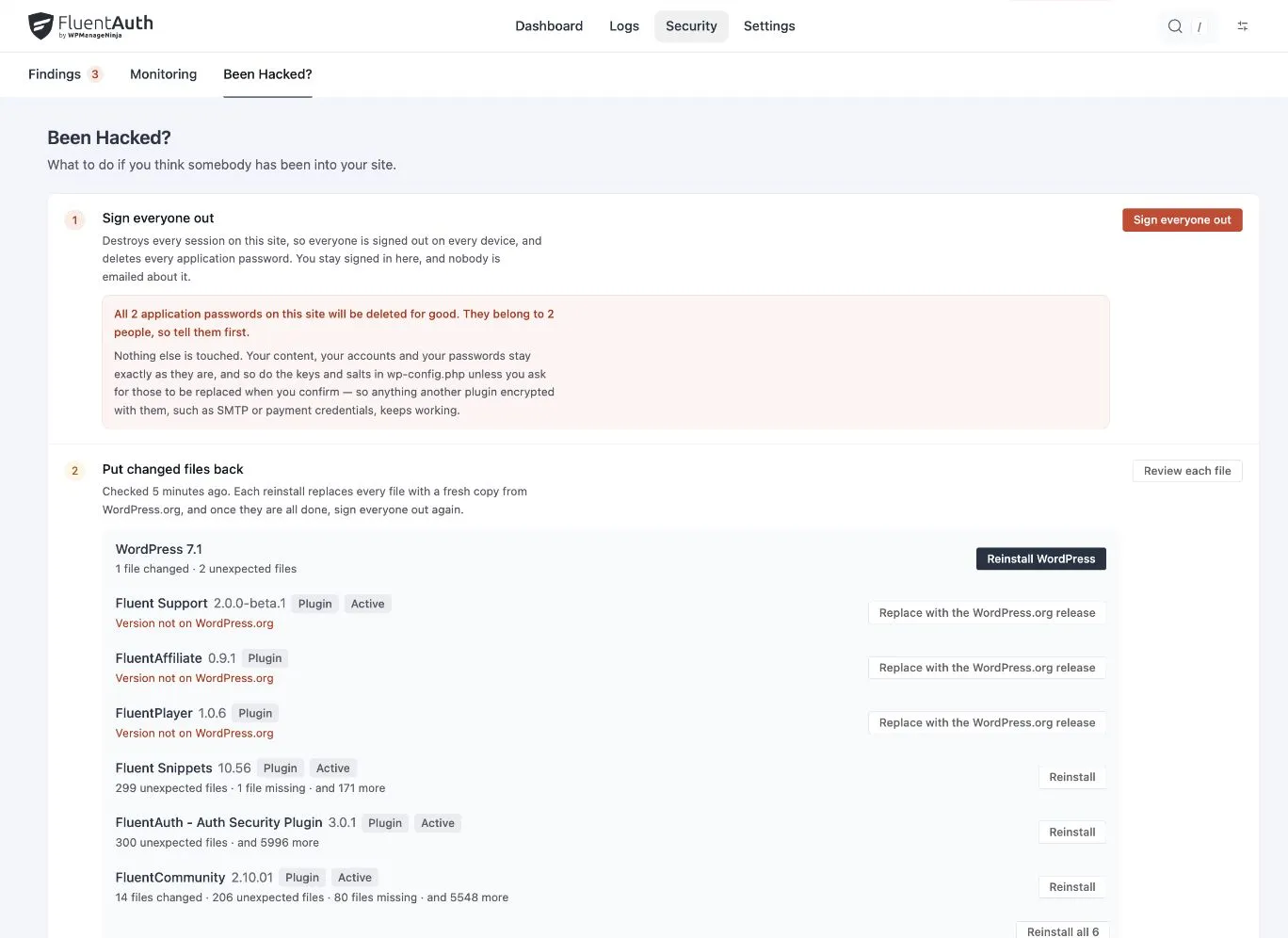
Use a trusted device and review the affected accounts. The Sign everyone out action invalidates existing sessions and revokes application passwords. It interrupts members and connected tools, so coordinate with the people responsible for essential services where possible.
Sending a password-reset link alone does not invalidate the old password. Review compromised accounts directly and confirm the recovery actions you actually completed. The session recovery article explains these distinctions.
If the site is actively harming visitors, work with the host on an appropriate temporary restriction while investigation continues. Login protection alone does not contain every type of compromise.
Investigate the files and their reference copies
FluentAuth can help identify differences between supported installed files and a reference. Since 3.0 the expanded tools include plugin and theme comparisons, diffs and baseline snapshots.
A modified file may be a deliberate customisation, a failed update or an unwanted change. A custom extension may have no official WordPress.org reference. Review the difference and its origin before choosing a replacement.
Use the file-change workflow. A new baseline records the current state; it does not establish that the state is trustworthy. Accepting a finding also does not repair it.
Repair the cause as well as the visible symptom
The recovery workspace can reinstall supported packages and help handle changed files. Preserve intended customisations and use a trusted vendor package or repository for extensions outside the WordPress directory.
Restoring files does not inspect every database record or repair a compromised hosting account. Review unfamiliar administrators, settings, content and infrastructure access as the evidence requires. WordPress’s hardening guidance provides broader maintenance context beyond a single plugin.
If the original entry point was vulnerable software, replacing its files with the same vulnerable version leaves that problem unresolved. Check the maintainer’s current security guidance and use a supported fix or replacement.
Verify the site and reconnect deliberately
Before closing the incident, confirm the public pages, administrator login, required verification, email delivery and essential integrations. Reissue application passwords only for approved connections. Review whether access could have been regained during repairs and whether another sign-out is needed.
Keep a short incident record: evidence, affected components, actions, tests and remaining questions. Assign an owner to each unresolved question. Follow-up alerts and activity review help you watch the repaired site, but a quiet log is not proof that every issue has been found.
The recovery documentation explains these tools and their limitations in detail.