php2shell: the PHP security hole every WordPress site owner should fix this week
Two critical bugs in PHP itself let an attacker take over a server without logging in. No WordPress plugin can block them. Here is how they work, how to check your server, and what to ask your host.
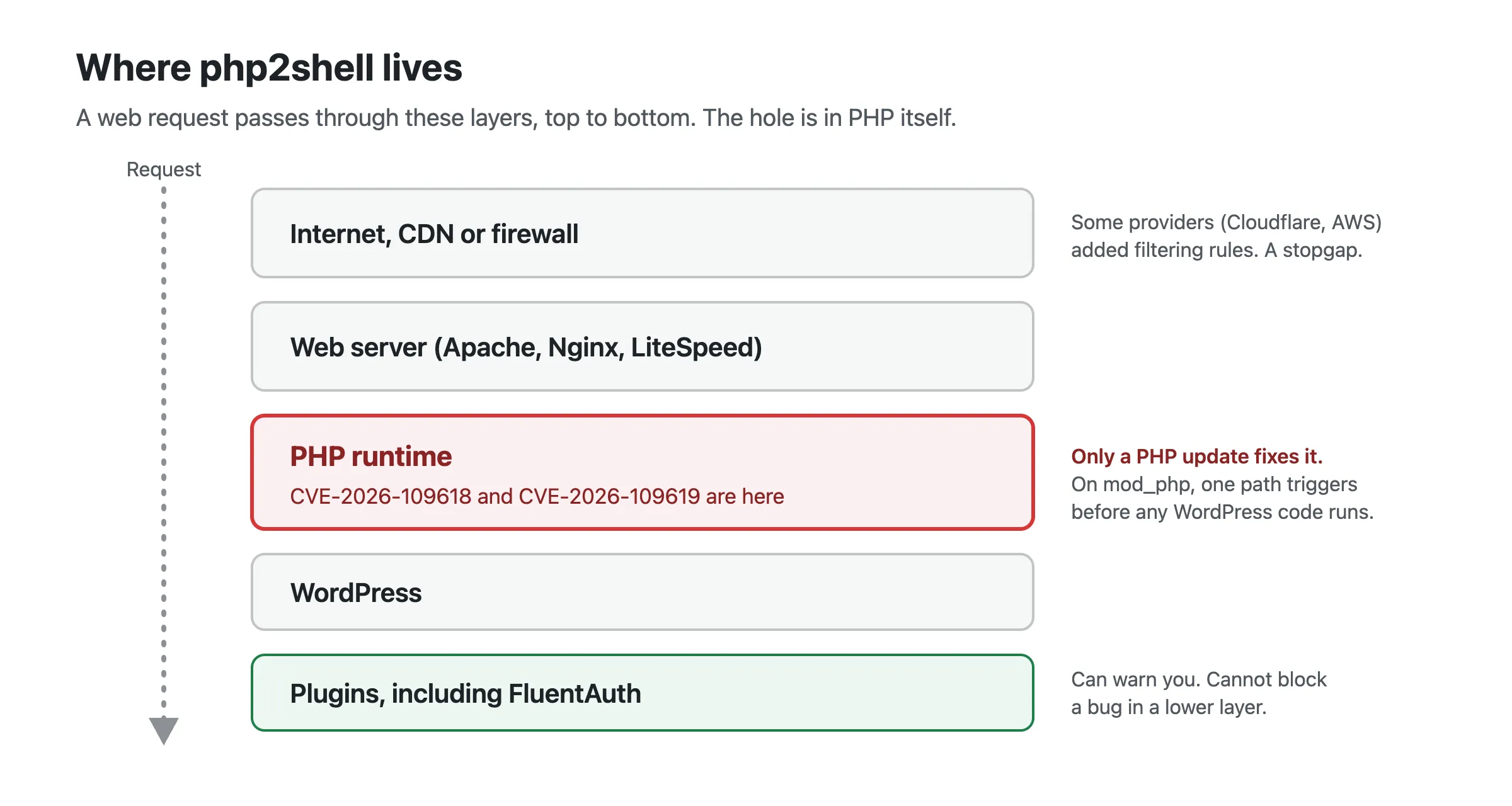
Short version: two critical bugs in PHP, nicknamed php2shell, let an attacker run their own code on a web server without logging in. They are in PHP itself, not in WordPress, so no plugin can block them. The fix is a PHP update on your server. Check your PHP version today, and if it is older than 8.2.35, 8.3.36, 8.4.27 or 8.5.12, ask your hosting provider to update it.
What happened
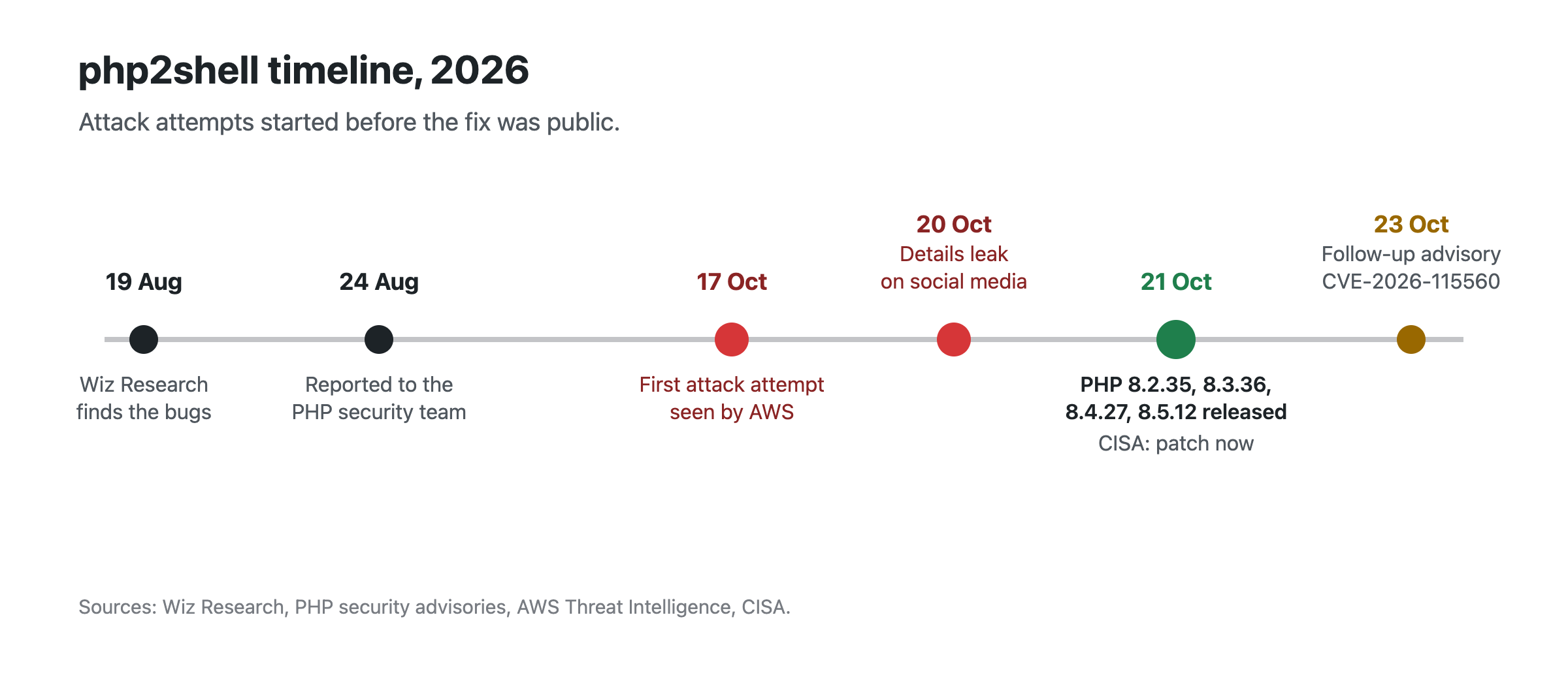
On 21 October 2026, the PHP project released fixes for two vulnerabilities: CVE-2026-109618 and CVE-2026-109619. Wiz Research found them in August and reported them to the PHP security team. PHP rates both 9.2 out of 10 (CVSS 4.0). The US National Vulnerability Database rates CVE-2026-109618 9.8 out of 10.
The release was not quiet. Details leaked on social media the day before. AWS saw an attempt to exploit the bugs in its honeypots on 17 October, before anything was public. Since the release, watchTowr and Cloudflare have reported attack traffic. On 21 October, CISA, the US cybersecurity agency, told everyone running PHP to patch immediately.
Why this one is serious
- No login needed. The attacker only has to send web requests to your site.
- Full takeover. “Remote code execution” means the attacker runs their own code on your server, with the same access as your website. They can read your database, add an administrator, plant malware, or use your server to attack others.
- It sits below WordPress. On servers that run PHP as an Apache module (mod_php), PHP confirms one path that triggers before any WordPress code runs. Security plugins, login limits and two-factor authentication never get a chance to act.
- Old PHP is affected too. Wiz and Cloudflare report that releases back to PHP 5.4 are vulnerable. PHP publishes fixed releases only for 8.2 and newer.
How the attack works
This section explains the idea behind each bug, for readers who want to know why a PHP update is the only fix. It is not a recipe. For full technical detail, read PHP’s own advisories, linked at the end.
Background: how PHP gives up on a request
PHP handles each web request in its own short life. It sets up memory and internal records for the request, runs the script, then cleans everything up. Sometimes PHP must stop a request at once, for example when it runs out of the memory it is allowed to use. It then takes an emergency exit, which PHP’s source code calls a bailout. The bailout jumps straight to the end of the request and skips the normal steps in between.
That shortcut is safe only if PHP’s internal records are in a consistent state at the moment it is taken. Both bugs are cases where they are not. PHP’s changelog describes the fix in five words: “Avoid state corruption via bailout”.
CVE-2026-109618: memory corruption on out-of-memory
PHP calls this one “RCE via OOM corruption”. An attacker sends a request that makes PHP run out of memory at a moment when an internal record is only half updated. The bailout leaves that record broken. By shaping the request, the attacker controls how the broken record is later used, and turns memory corruption into running their own code.
On mod_php, PHP’s advisory says this path “happens entirely before any application-specific code begins execution”. It needs nothing from WordPress, from your theme or from any plugin. PHP’s interim advice for this bug limits request size and memory, which points to how PHP takes in a request, not to any script. PHP judges PHP-FPM susceptible from source analysis, but nobody has demonstrated a full attack against it yet.
CVE-2026-109619: state that outlives its request
PHP calls this one “RCE via stale global state”. When a request is cut short, a piece of global state that belonged to it is not reset. Later code still trusts it and reads memory that has already been freed and reused, a bug class called use-after-free. An attacker who controls what lands in that freed memory can take control of what PHP does next.
Whether this one is reachable depends on the PHP configuration and the application. PHP’s interim advice points at two features that can reach it: session upload progress, and fatal-error backtraces on PHP 8.5. Attacks have been demonstrated on both Apache mod_php and PHP-FPM.
Am I affected?
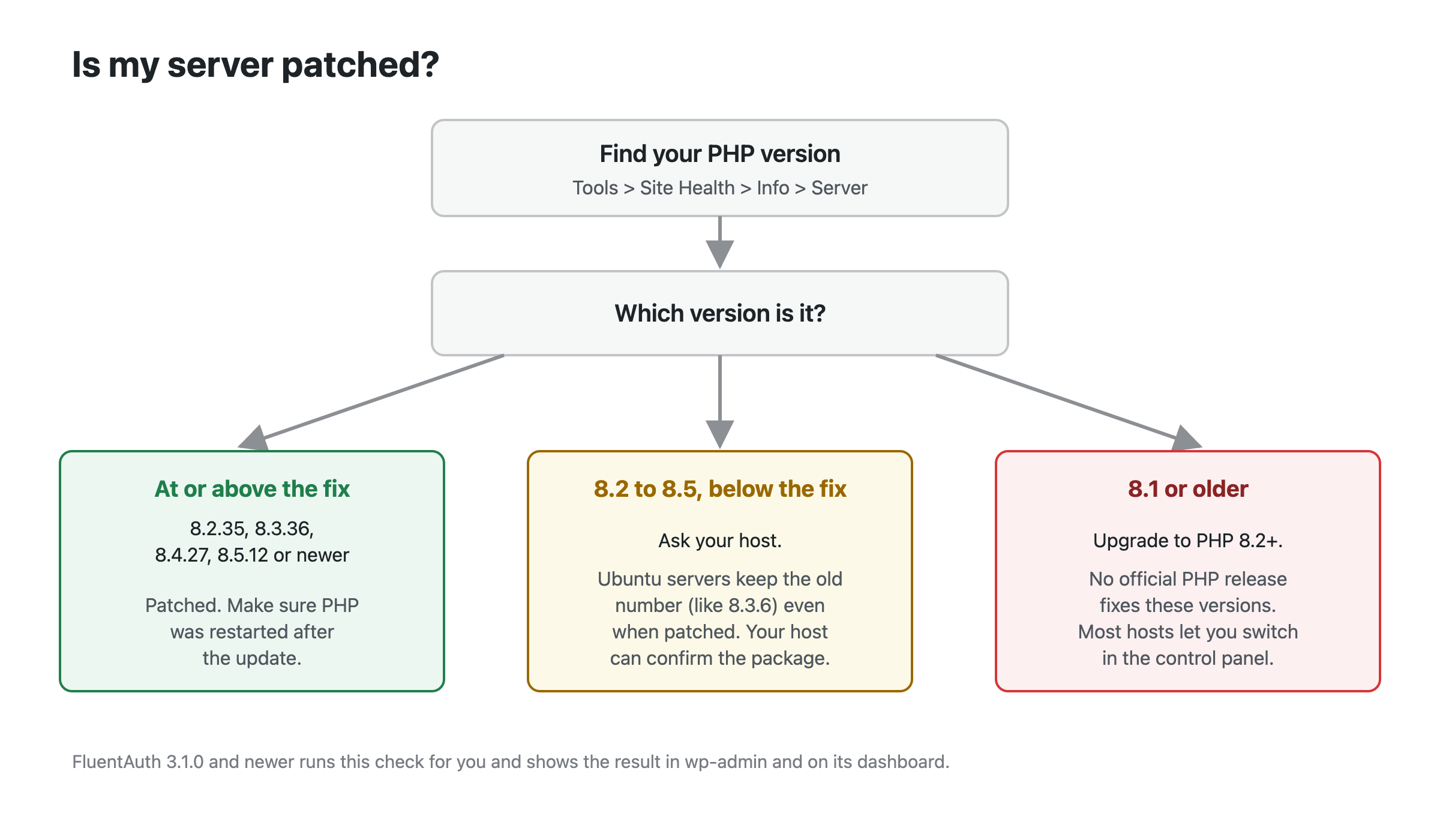
PHP says every PHP installation that serves web requests is at risk: PHP-FPM, Apache mod_php, php-cgi, FrankenPHP and LiteSpeed. The table shows the first fixed release on each branch.
| Your PHP branch | Fixed in | What to do |
|---|---|---|
| 8.5 | 8.5.12 | Update to 8.5.12 or newer |
| 8.4 | 8.4.27 | Update to 8.4.27 or newer |
| 8.3 | 8.3.36 | Update to 8.3.36 or newer |
| 8.2 | 8.2.35 | Update to 8.2.35 or newer. 8.2 stops getting security fixes on 31 December 2026, so plan a move to 8.3 or newer. |
| 8.1, 8.0, 7.4 | No release | Upgrade to PHP 8.2 or newer. PHP published source patches for these branches, but only a server administrator who builds PHP can use them. |
| 7.3 and older | No fix | Upgrade to PHP 8.2 or newer. |
To find your version in WordPress, go to Tools > Site Health > Info and open the Server section. That shows the PHP your website actually runs, which can differ from the PHP your host’s command line shows.
A note for Ubuntu servers
Ubuntu fixes PHP without changing the version number your site reports. A patched Ubuntu 24.04
server still says 8.3.6, and a patched Ubuntu 22.04 server still says 8.1.2. The fix is
in the package version: 8.3.6-0ubuntu0.24.04.13 and 8.1.2-1ubuntu2.28 or newer (Ubuntu
notice USN-8948-1). If your site reports one of those versions, ask your host which package is
installed. Debian is different: its fixed packages report the new PHP version (8.2.35 on
Debian 12, 8.4.27 on Debian 13).
What to do now
- Check your PHP version in Site Health, as above.
- If it is below the fix, contact your host today. Many hosts are already rolling out the update. If your control panel has a PHP version switcher, you can also move to a fixed release yourself.
- Make sure PHP restarts after the update. A PHP process that started before the update keeps running the old code. Your host handles this on managed hosting. On your own server, restart Apache, PHP-FPM and any long-running PHP workers.
- If you are on PHP 8.1 or older, upgrade to 8.2 or newer. Test on a staging copy first if you can. Most current plugins and themes support PHP 8.2.
- Check for signs of a break-in. Attacks started before the fix was public, so check even if you are patched now. Look for administrator accounts you do not recognise, and for changed or unknown files. If something looks wrong, change your passwords and your WordPress security keys, and ask your host for help. Our compromise response guide walks through it.
A message you can send your host
Hello, my site runs PHP [your version]. Please confirm that the server is patched for the php2shell vulnerabilities, CVE-2026-109618 and CVE-2026-109619, which are fixed in PHP 8.2.35, 8.3.36, 8.4.27 and 8.5.12. If it is not patched yet, when will it be? Thank you.
If you run your own server and cannot patch yet
PHP published interim mitigations. PHP itself says they “do not make an installation safe”. Use them only to buy time until you can update:
- Set
session.upload_progress.enabled = 0inphp.ini, the FPM pool or the server configuration, then restart every PHP worker. Do not rely onini_set()or a.user.inifile for this one. - On PHP 8.5, set
fatal_error_backtraces = 0and restart every worker. - Set
memory_limit = -1, preferably withphp_admin_valueso applications cannot override it. Cap memory with a container or cgroup limit instead. - Keep
post_max_sizelow: 8M if the site takes no uploads, 32M if it does. Keepupload_max_filesizebelow it, and limit request size at the web server or proxy too.
Read PHP’s advisory before you change these. Each one has side effects. If your site is behind Cloudflare, Cloudflare added firewall rules for these bugs on every plan, including free plans. That helps, but it is a stopgap, not a fix.
What FluentAuth is doing
We want to be plain about this: no WordPress plugin can protect you from php2shell, including ours. The bug is in the layer that runs WordPress. A plugin that claims to block it is guessing at what an attack looks like.
What a plugin can do is make sure you know. Small business owners do not read security mailing lists, but they do open their WordPress dashboard. So from FluentAuth 3.1.0:
- Administrators see a warning in wp-admin when the server’s PHP is older than the fixed release for its branch. The warning names the exact PHP version to ask your host for.
- The same warning appears at the top of the FluentAuth dashboard, so it is not hidden behind other notices.
- On PHP 8.1 and older, the warning asks you to upgrade to PHP 8.2 or newer, because no official release fixes those branches.
FluentAuth itself still supports PHP 7.3 and newer. The warning is about your server’s security, not about what the plugin needs.
One known gap: FluentAuth reads the version number PHP reports. On Ubuntu servers that were patched without a version change, the warning stays visible. If your host confirms the patched Ubuntu package is installed, you are safe and can ignore it.
FluentAuth’s security scan also helps with step 5 above. It compares your WordPress core, plugin and theme files against the official copies from WordPress.org, and lists every file that was changed or added. Run it after you patch.
One more advisory
On 23 October, PHP published a follow-up, CVE-2026-115560. It is a related problem in
session upload progress that needs an unusual configuration. PHP recommends
session.upload_progress.enabled = 0 until its next regular release. WordPress itself does not
use PHP sessions, so turning this off rarely affects a WordPress site. Ask your host about it
when you ask about the main update.
Sources
- PHP security advisory and releases, 21 October 2026
- PHP advisory for CVE-2026-115560, 23 October 2026
- GitHub advisory GHSA-w8hw-w9fx-j79w (CVE-2026-109618)
- GitHub advisory GHSA-6wmf-4rv5-p3rp (CVE-2026-109619)
- Wiz Research: php2shell
- CISA alert, 21 October 2026
- Ubuntu security notice USN-8948-1
- Debian security tracker
- AWS Threat Intelligence: exploitation before disclosure
- Cloudflare: WAF protection for the PHP vulnerabilities